


Tesla
4.710.40K Reviews
App Specs
- Version
- 4.61.0-4607
- Updated On
- License
- Free
- Downloads
- 5,000,000+
- Developer
- Tesla, Inc.
- Categories
- Lifestyle
- Platform
- Android, iOS
Screenshots
 Analysis by AppCompare
I’d approach the Tesla app as the day-to-day remote for a Tesla, not as a general driving tool. Its most useful moments are often brief: checking whether charging is underway, preparing the cabin before leaving, or confirming that the car is locked. That convenience depends on having a Tesla account and a vehicle to connect to, so it is not an app I’d recommend downloading in the hope that it will manage a car from another brand.
That distinction matters when you are deciding whether the setup is worth the effort. Tesla, Inc. makes this free lifestyle app for Android and iOS, and its appeal is closely tied to vehicle ownership. It has a 4.7 average from around 56,000 ratings, with over 5 million installs, but popularity is less important than whether its remote controls fit your routine. I would find it most valuable if I regularly checked charging or wanted a quick way to manage a few basic vehicle tasks from my phone.
Where setup and first use can feel confusing
The first hurdle is not learning a complicated menu; it is getting the account and vehicle relationship right. You need to sign in with your Tesla account, and new owners may be completing that step as part of taking delivery and setting up the car. I’d start with the same account used for the vehicle rather than trying different logins at random. If the car does not appear as expected, checking the account and the vehicle’s setup is a more sensible first move than repeatedly tapping remote controls.
Once the connection is in place, the uncluttered layout is a real strength. I can see why someone who dislikes crowded car software might appreciate the direct approach: the app is organized around the vehicle rather than a long list of lifestyle extras. The trade-off is that a clean screen cannot resolve every setup question for you. If you are helping a family member get started, take a moment to confirm they can sign in and see the correct vehicle before relying on the app for a time-sensitive task.
Small routines that make the app more useful
For everyday use, I would build a few checks into routines that already exist instead of opening the app constantly. Before walking away from the car, use the lock control if you are unsure; before leaving home, check charging progress if the battery level matters for that trip. These are simple habits, but they turn remote access into practical reassurance rather than another screen to monitor.
Charging schedules can be particularly helpful when your household has a preferred charging window. I’d set the schedule with the actual departure routine in mind, then check the status later rather than assuming that a single setting will suit every day. A changed plan, an unplugged cable, or an unexpected interruption can make a quick status check worthwhile. The app gives useful visibility, but the car and charging setup still determine what is happening physically.
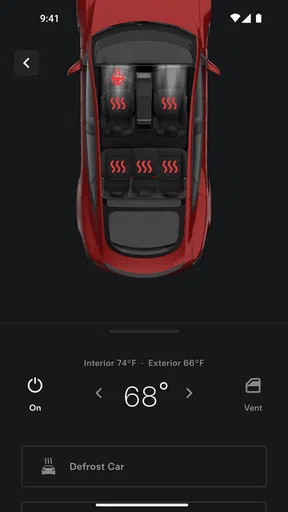
Climate control is another feature that makes more sense when tied to a real departure. On a cold morning, I could start cabin pre-conditioning while getting ready, then avoid leaving it running long after plans change. That is a small but meaningful trade-off: remote comfort is convenient, yet it works best when I use it deliberately instead of treating it as a button to press out of habit.
Worth Reading Before You Choose

Flipboard Shows What News Apps Must Do Beyond the Feed

Switching to Android Auto Means Rethinking Your Driving Routine

Google Calendar Makes a Crowded Week Easier to Manage

Ludo King Makes the Most of the Minutes Between Plans

Baby Panda World Brings Quick Play to Modern Phones, but Its Game Library Feels Busy

ESPN’s Live Game View Makes Following Close Games Easier
When a screen or command does not respond
If a remote action seems delayed, I would first check whether the phone has a working internet connection and give the request a little time before sending it again. Repeating a command quickly can make it harder to tell whether the first attempt worked. I’d then reopen the app and check the car’s displayed status. That is a calmer recovery path than assuming a control has failed or that the vehicle has changed state immediately.
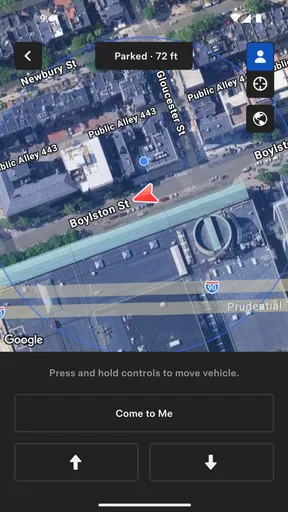
It also helps to separate information from action. A battery or charging status is useful for planning, but it is not a substitute for checking the cable or the charging equipment when something looks wrong. Similarly, a map location can help me orient myself in a large parking area, while flashing the lights or sounding the horn can make the final search easier. Those tools are practical aids, not guarantees that every situation will resolve from the phone.
What the app can and cannot replace
Compared with a typical general-purpose car app, Tesla’s is more closely focused on managing one manufacturer’s vehicle. That focus is a benefit if you own a Tesla: remote climate, lock controls, charging information, and trip planning sit together in one place. If you drive several makes, a multi-brand service or each manufacturer’s own app may fit better, even if it means giving up some of the Tesla-specific convenience. This is not a universal vehicle dashboard, and I would not choose it as one.
Trip planning can help prepare for a longer drive by showing a route and Supercharger stops. I would still treat the plan as a starting point, especially if weather, traffic, or personal stops change the day. For a straightforward trip, having charging stops in view can reduce the mental work of planning; for a journey with unusual constraints, I’d review the route rather than follow it blindly. The app supports the trip, but good judgement still belongs to the driver.
Who I’d recommend it to
I’d recommend it to Tesla owners who want quick access to vehicle status and everyday remote controls, particularly people who charge at home or often need to check the car while away from it. It may also suit a household where one person handles charging and another wants a straightforward way to confirm the vehicle’s state. If you do not own or manage a Tesla, there is little reason to make it part of your regular phone setup.
The app is free, rated for Everyone, and its current version is 4.57.0-4306, with Android 7.0 or later listed as the minimum operating system. It has been available since January 31, 2013, and its long history shows in the range of ownership tasks it brings together. Still, I would not take a high rating as a promise that every connection will be instant: the phone’s network, account setup, and the vehicle’s own state all affect how smooth a particular session feels.
For anyone new to it, I’d begin with three low-pressure checks: sign in and confirm the right vehicle appears, try a status check while you are near the car, and learn where the lock and climate controls sit before you need them in a hurry. That makes later use feel much less mysterious. If a control does not work, check the connection and displayed status first, then consider whether the issue is with the account, the vehicle, or the charging setup rather than treating every delay as an app problem.
My overall view is that the Tesla app earns its place through convenience, not novelty. It gathers useful vehicle tasks into a phone interface and can make charging, parking, and departure routines easier to manage. The limitations are real: it is designed around Tesla ownership, remote actions depend on connectivity, and a screen cannot fix a physical charging or vehicle issue. For the right owner, though, it is a practical companion I’d keep installed; for someone shopping for a brand-neutral car utility, I’d look elsewhere.
Alright, folks, let’s dive into the world of the Tesla app, a nifty little tool for all you Tesla car owners out there. If you’re curious about how this app can make your driving experience more seamless, keep reading. I’ve taken it for a spin, and here’s what I think.
Getting Started with the Tesla App
First things first, downloading and setting up the Tesla app is a breeze. It’s available on both Android and iOS, so you’re covered no matter what side of the smartphone fence you’re on. Once you’ve got it installed, logging in requires your Tesla account credentials. If you’re a new owner, this will be part of your initial setup when you get your car.
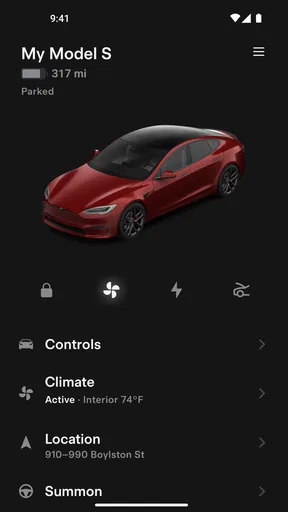
The app interface is sleek and intuitive, much like the cars themselves. You’ll find a straightforward layout with easy-to-understand icons. Honestly, it’s like the app version of a Tesla dashboard—minimal yet packed with everything you need.
Features That Make a Difference
One of the standout features is the ability to control your car remotely. Imagine this: it’s a freezing morning, and you’re still in your cozy pajamas. No worries! You can start your car’s climate control from the comfort of your home. The app lets you pre-condition the cabin to your desired temperature. Pretty neat, right?
Another killer feature is the location tracking. If you’ve ever parked in a massive lot and forgotten where you left your car, this feature is a lifesaver. The app shows your car’s exact location on a map. Plus, you can even honk the horn or flash the lights if you need a bit more help finding it.
For those concerned about security, the app offers peace of mind with its remote lock and unlock capability. Forgot to lock your car? No problem. A quick tap on your phone, and it’s locked up tight.
Driving Insights & Updates
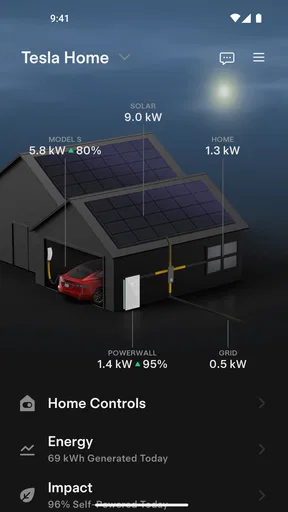
The app also provides real-time data on your car’s status. You can check your battery level, view charging progress, and even schedule charging times to take advantage of off-peak electricity rates. It’s like having a personal assistant for your car.
Software updates? The app’s got you covered there, too. Tesla frequently rolls out updates to improve vehicle performance and add new features. You’ll receive notifications when updates are available, and you can install them with a few simple taps.
Navigation and Trip Planning
If you’re planning a road trip, the app’s trip planner is incredibly handy. It calculates the best route and identifies supercharger locations along the way. This ensures you’re never caught off guard with a low battery. It’s like having a personalized navigator that knows your car’s needs.
A Few Thoughts on Usability
While the app is generally user-friendly, there’s always room for improvement. Some users might find the initial setup a bit daunting, especially if they’re not tech-savvy. However, once you’re past that hurdle, it’s smooth sailing.
Connectivity issues can occasionally pop up, but these are rare and usually resolved quickly. The app relies on a stable internet connection, so make sure your phone’s data or Wi-Fi is reliable.
Final Thoughts
All in all, the Tesla app is a fantastic companion for Tesla car owners. It’s packed with features that make owning and driving a Tesla even more enjoyable. From remote controls to real-time data and updates, the app truly enhances the user experience. If you’re a Tesla owner, this app is a must-have. Trust me, once you start using it, you’ll wonder how you ever lived without it.
Pros
- User-friendly interface
- easy to navigate.
- Real-time vehicle status updates.
- Advanced safety features and alerts.
- Remote control of car functions.
- Frequent software updates enhance functionality.
Cons
- Limited compatibility with non-Tesla vehicles.
- Requires constant internet connection.
- Some features need premium subscription.
- Occasional app connectivity issues.
- Battery usage can be high on mobile devices.
FAQs for Tesla
What features does the Tesla app offer?
The Tesla app provides a range of features that enhance your vehicle's functionality. Users can remotely start and stop charging, monitor battery levels, locate the car, and even control climate settings. Additionally, the app allows for software updates and scheduling service appointments, making it essential for Tesla owners.
Is the Tesla app available on both Android and iOS?
Yes, the Tesla app is available for both Android and iOS platforms. It can be downloaded from the Google Play Store for Android devices and the Apple App Store for iOS devices. Ensure your device meets the app's system requirements for optimal performance.
Can I control my Tesla remotely using the app?
Absolutely. The Tesla app enables remote control of various car functions, such as unlocking and locking doors, honking the horn, and flashing lights. You can also start the car’s climate system to precondition the interior before you reach it, offering convenience and comfort.
Does the Tesla app provide real-time updates on my vehicle's status?
Yes, the app provides real-time updates on your Tesla's status, including battery charge level, estimated range, and charging progress. It also sends notifications about software updates and maintenance reminders, ensuring you are always informed about your vehicle’s condition.
Is the Tesla app secure to use?
The Tesla app is designed with security in mind, employing encryption and authentication protocols to protect your data. However, users should ensure their account credentials are secure and enable multi-factor authentication to add an extra layer of security to their Tesla account.


